I wanted to find out how long it takes to download my 2TB photo library from iCloud. To do that I wanted to monitor the file size of the library. I created a short shell script and packaged it using automator into an app. Unfortunately I had to run it manually to create a data point. I researched different options to run apps regularly in macOS
1. Launch Agents (Using launchd)
- Description: The
launchdservice allows you to create and manage a Launch Agent (a.plistfile) to schedule app launches or background tasks. These files are stored in~/Library/LaunchAgents. - Disadvantages:
- Requires knowledge of XML-based
.plistsyntax. - Debugging errors can be difficult without proper tools.
- Changes require reloading or restarting the
launchdservice.
- Requires knowledge of XML-based
2. Cron Jobs (via cron)
- Description: Although deprecated in favor of
launchd, cron is still available for scheduling recurring tasks via thecrontabcommand. - Disadvantages:
- Requires familiarity with the
cronsyntax and terminal usage. - May not handle macOS-specific contexts (e.g., GUI applications) well.
- Deprecated, so it might lack support in future macOS versions.
- Requires familiarity with the
3. Automator
- Description: Automator allows users to create workflows or applications that can be scheduled via Calendar or saved as login items.
- Disadvantages:
- Limited control over advanced scheduling options.
- Some tasks may require additional scripting, which can increase complexity.
- Less flexible than scripting-based solutions for complex needs.
- Calendar items can only be repeated daily – not every hour.
4. Login Items
- Description: Apps can be added to “Login Items” in System Preferences to launch automatically upon user login.
- Disadvantages:
- Only triggers on user login, not suitable for recurring tasks at specific times.
- Maintenance can be cumbersome if managing multiple apps.
5. Shell Scripts and Scheduled at Commands
- Description: Scripts can be written to launch apps and scheduled using tools like
ator triggered manually. - Disadvantages:
- Requires scripting knowledge and familiarity with the command line.
- Limited scheduling capabilities compared to
cronorlaunchd. - May lack robustness for recurring tasks.
Non of these were easy to use and easy to maintain. So I started the development of my own solution: AutoRun.
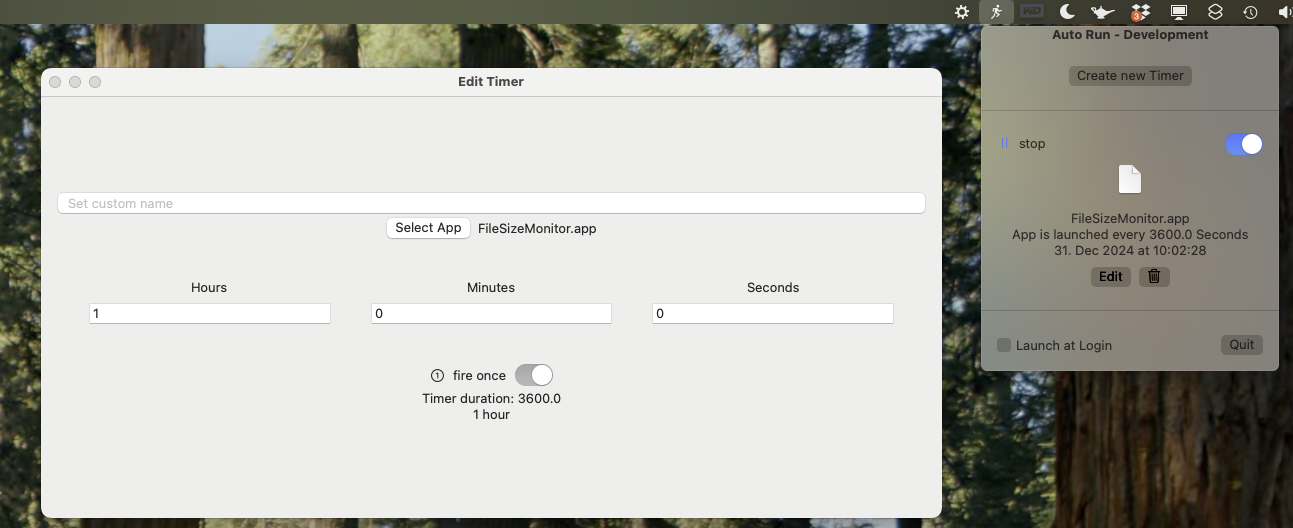
It’s currently in a prototype phase. No design work has been done. It’s only a proof of concept to see if this works. You can download the source code and a compiled app at GitHub.